Have you ever wondered how businesses seem to appear magically at the top of your Google search results? The answer is almost always Google Ads. As the dominant force in online advertising, Google Ads is the powerful tool that puts companies in front of customers precisely when they’re searching. This comprehensive guide will explore everything you need to know about Google Ads, from its core functionality to advanced strategies for success. In other words, whether you’re a complete beginner or looking to refine your approach, understanding the intricacies of these ads is essential for any modern business aiming to thrive.
What Exactly Are Google Ads?
At its simplest, Google Ads is an online advertising platform developed by Google. In fact, it allows businesses to create and display ads across Google’s vast network, which includes its search engine, partner websites, YouTube, and mobile apps. When you use Google to search for a product, service, or answer, the sponsored listings at the top and bottom of the results page are Google Ads. Furthermore, these aren’t random placements; they are highly targeted ads shown to users based on their specific search queries, demographics, and online behaviors. The system operates on a pay-per-click (PPC) model, meaning advertisers pay a fee each time someone clicks on their ad.
The brilliance of the Google Ads platform lies in its intent-based targeting. Unlike traditional advertising that interrupts, Google Ads connects businesses with potential customers at the very moment they express interest. For instance, if someone searches for “best running shoes for flat feet,” a shoe retailer can have their ad appear, offering a direct solution. Therefore, this makes Google Ads one of the most efficient and measurable forms of marketing available today.
Key Characteristics of Google Ads:
- Auction-Based: Advertisers bid for ad placement.
- Pay-Per-Click (PPC): You pay primarily when users engage.
- Intent-Driven: Targets users based on their active searches.
- Highly Measurable: Every click and conversion can be tracked.
Why Your Business Absolutely Needs Google Ads
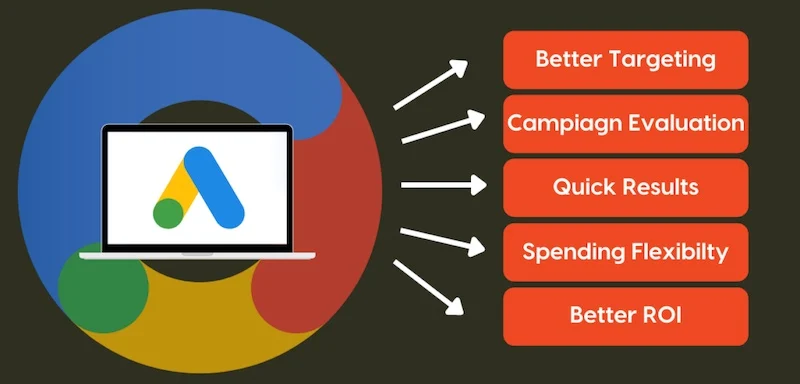
In today’s digital landscape, simply having a website isn’t enough. Consequently, you need a way to drive targeted traffic to it, and that’s where Google Ads becomes indispensable. The primary reason to use Google Ads is immediate visibility. Unlike Search Engine Optimization (SEO), which can take months to yield results, a well-structured Google Ads campaign can place you on the coveted first page of Google within hours. In summary, this instant access to a ready-to-buy audience is unparalleled.
Furthermore, Google Ads offers unparalleled control and flexibility. For example, you set your own budget, decide exactly where your ads appear, and can start, stop, or adjust campaigns at any moment. The platform also provides deep, actionable insights into your audience’s behavior, allowing you to understand what works and refine your strategy in real-time. Ultimately, for businesses of any size, from local shops to global corporations, Google Ads levels the playing field, allowing you to compete for attention based on the relevance of your ads and your budget.
Top Benefits of Using Google Ads:
- Immediate Results: Gain visibility from day one.
- Precise Targeting: Reach users by location, device, time, and keywords.
- Budget Control: You decide your daily and monthly spend.
- Measurable ROI: Clearly see the return on your advertising investment.
- Brand Awareness: Increase visibility even if users don’t click.
Core Capabilities and Features of the Google Ads Platform
The Google Ads platform is not a one-trick pony; it’s a sophisticated suite of advertising tools. Understanding its core capabilities is the first step to crafting successful campaigns. First and foremost, Google Ads allows you to create different types of ads tailored to various goals. For instance, you can run text-based search ads on the search engine results pages (SERPs), display visual banner ads across millions of websites, showcase products with Shopping ads, and engage users with video ads on YouTube. Each ad format serves a unique purpose in the customer journey.
Beyond ad creation, Google Ads provides powerful audience targeting features. Specifically, you can target users based on:
- Keywords: The search terms they use on Google.
- Demographics: Age, gender, parental status, and household income.
- Interests and Habits: Detailed affinity audiences and in-market segments.
- Remarketing: Re-engage users who have previously visited your website or used your app.
Moreover, the platform’s robust analytics dashboard is another critical feature. It tracks key performance indicators (KPIs) like clicks, impressions, click-through rate (CTR), conversion rate, and cost per acquisition (CPA). As a result, this data is vital for understanding the effectiveness of your ads and making informed optimizations.
Exploring the Different Google Ads Campaign Types
Choosing the right campaign type is fundamental to achieving your marketing goals. Google Ads offers several primary campaign types, each designed for a specific outcome.
1. Search Network Campaigns
These are the classic text ads that appear on Google Search results. They are perfect for capturing high-intent users who are actively looking for what you offer. For example, you select keywords related to your business, and your ad appears when those terms are searched. A plumber might target keywords like “emergency plumber near me” or “leaky faucet repair.” Therefore, creating compelling ad copy with strong calls-to-action is crucial for success in Search campaigns.
2. Display Network Campaigns
Instead of targeting keywords, Display ads target audiences across a vast network of over two million websites, apps, and Google properties like Gmail and YouTube. These are visual ads (banners, images, interactive media) ideal for building brand awareness and reaching users as they browse online. You can target by interests, demographics, or specific website placements. In particular, remarketing campaigns, which show ads to past website visitors, are a highly effective type of Display campaign.
A Deep Dive into Remarketing Campaigns
Remarketing is arguably one of the most powerful features in the Google Ads arsenal. Think about your own online behavior. You visit a website, look at a product, but then leave. Later, you see an ad for that exact product on a news site you’re reading. That’s remarketing in action. Essentially, it works by placing a small cookie in the browser of users who visit your site. Afterward, as they browse the web, your tailored ads can follow them, gently reminding them of what they viewed.
This strategy is effective because it focuses on warm leads—people who have already expressed interest. Consequently, your conversion rates are typically much higher, and your cost per acquisition lower, compared to cold traffic. To set this up, you need to create audience lists in your Google Ads account and then build campaigns specifically targeted to those lists.
3. Shopping Campaigns
Essential for e-commerce businesses, Shopping campaigns showcase your products directly in the Google Search results and on the Shopping tab. These ads display a product image, title, price, and store name, providing a rich, visual snapshot that drives qualified traffic to your product pages. To run Shopping ads, you need a product feed—a file containing details of all the items you wish to advertise.
4. Video Campaigns
Hosted on YouTube (owned by Google), Video campaigns allow you to run skippable and non-skippable video ads. They are incredibly powerful for storytelling, demonstrating products, and engaging users in a format they love. Additionally, Video campaigns can be used for a wide range of goals, from increasing brand awareness to driving direct website conversions.
5. Performance Max Campaigns
This is a newer, goal-based campaign type that utilizes Google’s automation across all its networks (Search, Display, YouTube, Gmail, Maps) to find converting customers. You provide assets (headlines, images, videos, descriptions), and Google’s AI optimizes the mix and placement to deliver the best results. Ultimately, it’s a powerful option for maximizing reach and conversions.
How to Set Up Your First Google Ads Campaign: A Step-by-Step Walkthrough
Getting started with Google Ads can seem daunting, but by following a clear process, you can launch your first campaign with confidence.
Step 1: Define Your Goal
Before you log in, ask: What do I want to achieve? Common goals include generating website sales, capturing leads, increasing phone calls, or driving foot traffic to a store. Importantly, your goal will determine your campaign type, settings, and how you measure success.
Step 2: Conduct Keyword Research
For Search campaigns, this is the most critical step. You need to find the words and phrases your potential customers are typing into Google. Use Google’s Keyword Planner tool (within Google Ads) to discover relevant keywords, see their average search volume, and gauge competition. Focus on a mix of short-tail (broad) keywords like “Google Ads” and long-tail (specific) keywords like “how to set up a Google Ads search campaign for beginners.” Typically, long-tail keywords often have lower competition and higher conversion intent.
Step 3: Create Your Campaign Structure
Organization is key in Google Ads. A best-practice structure is:
- Campaign: Houses your overall goal and budget (e.g., “Branded Search”).
- Ad Group: Contains a set of closely related keywords and the ads that target them (e.g., “Google Ads Management Services”).
- Keywords & Ads: The specific terms and the corresponding text or visual creatives.
Therefore, a well-structured account makes management and optimization far easier.
Step 4: Write Compelling Ad Copy
Your ad is your digital sales pitch. For Search ads, you typically have three headlines, two descriptions, and a display URL. Use your main keywords naturally in the headlines. Subsequently, highlight unique value propositions, include a strong call-to-action (e.g., “Buy Now,” “Get a Free Quote”), and consider using ad extensions. Extensions like sitelinks, callouts, and structured snippets provide extra information and can significantly improve your ad’s visibility and click-through rate.
Mastering the Art of Ad Copy and Extensions
Writing great ad copy is both an art and a science. First, you must speak directly to the user’s search intent. If they search for “affordable laptop repair,” your headline should mention affordability and repair. Next, use your descriptions to build urgency or trust with phrases like “Same-Day Service” or “Certified Technicians.” Always include a clear call-to-action telling the user exactly what to do next.
Meanwhile, ad extensions are your best friend. They take up more real estate on the search results page, which improves visibility. For example, sitelink extensions can direct users to specific, high-converting pages like “Service Areas” or “Book an Appointment.” Callout extensions let you list key benefits that don’t fit in the main description. By using these tools, you make your ad more useful and informative, which Google rewards with better placement.
Step 5: Set Your Budget and Bidding Strategy
Decide on a daily budget you’re comfortable with. Google Ads offers several bidding strategies, from manual cost-per-click (CPC) where you set a max bid, to automated strategies like “Maximize Conversions” where Google’s AI sets bids to get the most conversions within your budget. For beginners, starting with a manual or automated strategy focused on clicks can be a good way to learn.
Step 6: Implement Conversion Tracking
This is non-negotiable. Conversion tracking tells you what happens after someone clicks your ad—did they make a purchase, fill out a contact form, or call your business? By placing a small piece of code (the Google Ads tag) on your website, you can measure your true return on investment (ROI). Without it, you’re flying blind.
Advanced Google Ads Strategies for Maximum Performance
Once you’ve mastered the basics, implementing advanced strategies can dramatically improve your results and lower your costs.
Mastering Negative Keywords
This is a secret weapon for efficiency. Negative keywords are terms you don’t want your ads to show for. For example, if you sell new furniture, you might add “free” or “used” as negative keywords to avoid attracting people looking for free hand-me-downs. Regularly updating your negative keyword list prevents wasted spend on irrelevant clicks.
Leveraging Ad Extensions
As mentioned earlier, ad extensions make your ads larger and more informative, which can boost CTR. Use every relevant extension:
- Sitelink Extensions: Add additional links to specific pages (e.g., “View Our Menu,” “Contact Us Today”).
- Callout Extensions: Highlight key benefits or offers (e.g., “Free Shipping,” “24/7 Support”).
- Structured Snippet Extensions: Showcase features or product categories (e.g., “Brands: Nike, Adidas, New Balance”).
The Power of Remarketing
As previously discussed, remarketing campaigns target users who have already interacted with your brand. These users are far more likely to convert. You can create ads that remind them of the products they viewed, offer a special discount to complete a purchase, or simply keep your brand top-of-mind. Setting up remarketing requires creating audience lists from your website traffic.
Utilizing Smart Bidding
Google’s machine learning-powered Smart Bidding strategies (like Target CPA, Target ROAS, Maximize Conversions) can outperform manual bidding. They analyze vast amounts of data in real-time to set the optimal bid for each and every auction. However, to use them effectively, you need to have consistent conversion data feeding the algorithm.
Conducting A/B Testing (Ad Experiments)
Never assume your first ad is the best. Always run A/B tests (called Experiments in Google Ads) to compare different versions. Test different headlines, descriptions, calls-to-action, or even landing pages. Then, use the data to identify what resonates best with your audience and continuously improve your campaign performance.
Analyzing and Optimizing Your Google Ads Campaigns
Launching a campaign is just the beginning. Continuous analysis and optimization are what separate successful advertisers from those who waste money. You should regularly review your campaign reports in the Google Ads interface. Key metrics to monitor include:
- Click-Through Rate (CTR): The percentage of people who see your ad and click it. A low CTR may indicate poor keyword relevance or weak ad copy.
- Conversion Rate (CVR): The percentage of clicks that result in a desired action. A low CVR often points to a disconnect between the ad and the landing page experience.
- Cost Per Conversion/Acquisition (CPA): The average amount you pay for each conversion. This is your ultimate measure of efficiency.
- Quality Score: A diagnostic tool (scale 1-10) that Google assigns to your keywords. It’s based on expected CTR, ad relevance, and landing page experience. A higher Quality Score can lead to lower costs and better ad positions.
Based on your analysis, take action. For instance, pause underperforming keywords or ads. Increase bids on high-converting terms. Adjust your ad schedule if you see better performance at certain times of day. Similarly, refine your targeting. In conclusion, optimization is an ongoing cycle of test, measure, and refine.
Understanding and Improving Your Quality Score
Quality Score is a core concept that directly impacts your cost and ad position. Think of it as Google’s rating of the quality and relevance of your keywords and ads. A high score (7-10) tells Google that your ad is useful to searchers. Consequently, Google rewards you with lower costs per click and higher ad placements.
Three main factors determine Quality Score:
- Expected Click-Through Rate (CTR): How likely Google thinks your ad will be clicked based on historical performance.
- Ad Relevance: How closely your ad copy matches the user’s search intent.
- Landing Page Experience: How relevant, transparent, and easy-to-use your landing page is for the user who clicks.
To improve your Quality Score, focus on these areas. First, write highly relevant ad copy that includes the keyword. Next, ensure your landing page delivers exactly what the ad promises and loads quickly on all devices. Finally, organize your ad groups tightly so that all keywords in a group are closely related. Over time, these practices will lift your scores and improve your campaign’s efficiency.
Common Google Ads Mistakes to Avoid
Many beginners fall into predictable traps that drain budgets. Being aware of these can save you significant time and money.
Mistake 1: Targeting Too Broadly
Using only broad-match keywords without negatives can lead to irrelevant clicks. Start with a focused set of keywords and expand carefully.
Mistake 2: Sending Traffic to a Poor Landing Page
Your ad and landing page must be a cohesive experience. If your ad promises “50% Off Winter Coats,” the landing page should feature that exact sale, not just your generic homepage. A poor landing page will kill your conversion rate.
Mistake 3: Setting and Forgetting
Google Ads requires active management. Campaigns that aren’t regularly monitored and tweaked will see performance degrade over time as competition and user behavior change.
Mistake 4: Ignoring Mobile Users
A huge portion of Google searches happen on mobile devices. Ensure your ads and landing pages are mobile-friendly. You can adjust bids specifically for mobile devices in your campaign settings.
Mistake 5: Not Using Audience Targeting
Even in Search campaigns, layering on audience targeting (like in-market or remarketing lists for search ads – RLSAs) can help you refine who sees your ads, making your spend more efficient.
Conclusion: Taking Control of Your Growth with Google Ads
Navigating the world of Google Ads can be complex, but its potential to transform your business is immense. By understanding the platform’s core principles—from choosing the right campaign type and conducting thorough keyword research to writing compelling ads and implementing rigorous tracking—you lay the foundation for success. Remember, mastery comes from continuous learning, testing, and optimization. The Google Ads landscape is dynamic, with Google constantly introducing new features and ad formats.
Start with a clear goal, a modest budget, and a willingness to experiment. Then, use the data from your campaigns as your guide, letting it tell you what’s working and what isn’t. Whether you manage your ads in-house or partner with an expert, a strategic approach to Google Ads is one of the smartest investments you can make in the digital age. Ultimately, it’s more than just buying ads; it’s about systematically connecting with customers who are actively seeking what you provide, making it one of the most powerful engines for business growth ever created.










Leave a Comment